
How to Evaluate a Camera Built Into—or Powered by—an Outlet
Reviewed listings distinguish 4K streaming from 1080p recording. See which sockets work, where footage goes and what happens during internet or power loss.
First, clarify what “outlet camera” means
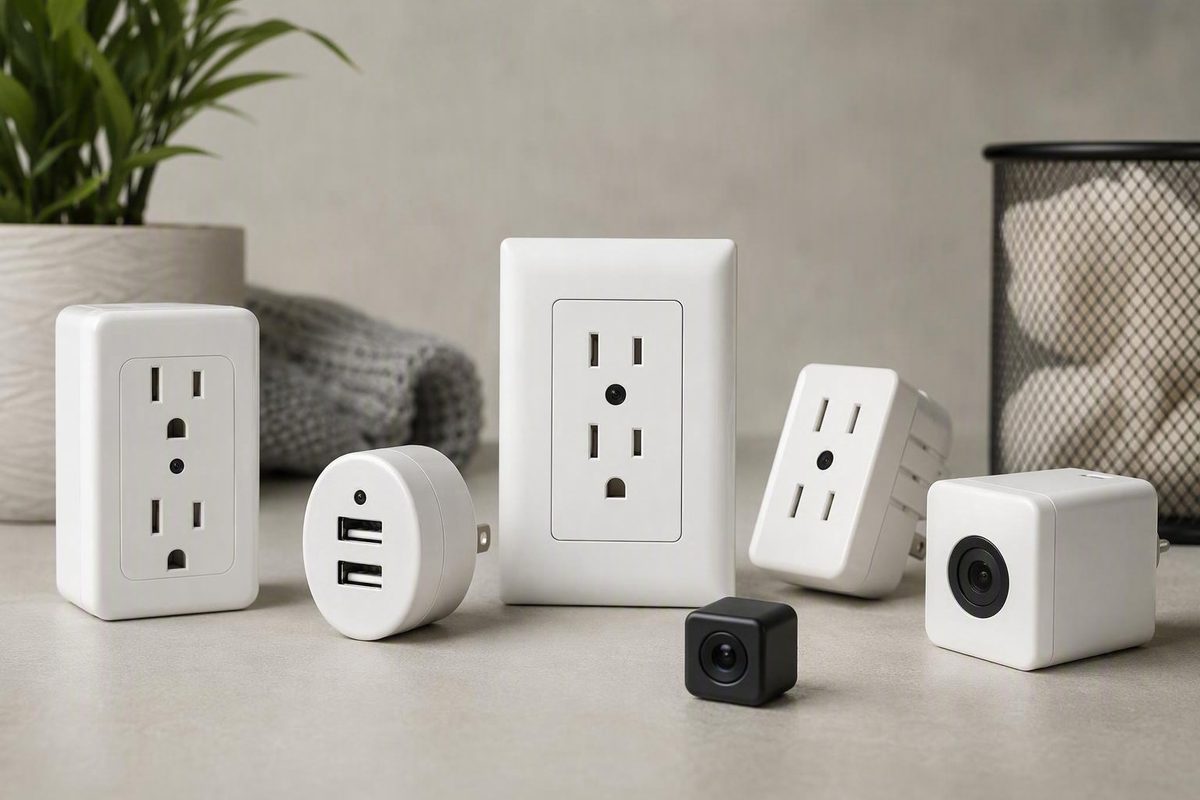
“Outlet camera” is an ambiguous shopping term. Retailers use it for cameras concealed inside replacement receptacles, USB chargers, wall adapters, night lights, charging hubs, power strips, and surge protectors. Security-camera manufacturers also use similar language for ordinary, visible Wi-Fi cameras that receive continuous power from a wall outlet.
That creates three practical categories:
- Hardwired replacement receptacle: A device installed in an electrical box in place of an existing receptacle. Depending on the model, its AC sockets or USB ports may be functional.
- Plug-in charger or adapter camera: A device that plugs into an existing receptacle and resembles a USB charger, night light, multi-outlet adapter, or similar accessory.
- Visible plug-in Wi-Fi camera: A conventional security camera powered through an AC adapter. It is not disguised as an outlet, although buyers may still describe it as an outlet-powered camera.
The word wireless does not necessarily mean battery-powered. It commonly describes how a camera transmits data—usually over Wi-Fi—while the camera continues to draw power from a wall outlet. Manufacturer guidance distinguishes these plug-in Wi-Fi products from battery-powered and fully wired systems and notes that they depend on both outlet power and adequate Wi-Fi coverage (eufy’s wired-versus-wireless camera overview).
A quick decision rule can narrow the search:
- Consider a concealed receptacle or adapter format only when discretion is necessary and the intended use has been reviewed for authority, consent, electrical suitability, and network risk.
- Consider a visible plug-in camera when positioning, transparency, deterrence, recognizable documentation, or easier replacement matters more than concealment.
- Consider a wired camera system when sustained recording is the priority and installing the necessary cable is practical.
A visible camera may be easier to position at a useful height and angle than a fixed camera built into a floor-level outlet. It may also be easier to identify the manufacturer, locate the correct manual, compare app requirements, and determine what support the vendor promises. These are practical considerations, not independently tested advantages.
A concealed device offers discretion, but that feature may come with fixed placement, unclear documentation, electrical-installation questions, and greater privacy concerns. Concealment should never be used to evade applicable rules or the rights of affected people.
This guide does not name a best outlet camera. The available evidence consists primarily of retailer listings and manufacturer explanations rather than independent testing of image quality, electrical construction, cybersecurity, heat, durability, app behavior, or recording reliability. The useful comparison is therefore not “Which listing sounds best?” but “Which claims can be confirmed for the exact device, variant, and location?”
Outlet-camera formats and what each one actually does
Outlet-style products vary considerably even when they look similar. The table below summarizes formats found in the reviewed retailer catalogs. Prices and availability were reviewed on August 12, 2026 and are only listing snapshots. Every capability is seller-provided and model-specific, not a category-wide guarantee.
| Format | Installation | Claimed functional AC power | Claimed functional USB charging | Wi-Fi viewing | Local storage arrangement | Observed listing snapshot |
|---|---|---|---|---|---|---|
| Standard replacement receptacle | Hardwired in an electrical box | Available on selected models | Sometimes | Available on selected models | Removable microSD or unspecified | About $299–$395 (reviewed receptacle listings) |
| GFCI-style receptacle | Hardwired; installation requirements vary | Claimed on selected models | Varies | Available on selected models | Model-specific or unspecified | A captured listing at $374 (retailer catalog) |
| USB receptacle | Hardwired | Often claimed | Claimed on selected models | Available on selected models | Removable card or unspecified | A captured listing at $239.99 (outlet and charger catalog) |
| USB wall charger | Plugs into an existing outlet | Normally no additional AC socket | Claimed on some models | Some models; DVR-only versions also appear | Removable, preinstalled, or internally inaccessible card | About $59.95–$219.99 (charger listings) |
| Night-light adapter | Plugs into an existing outlet | Varies | Available on selected models | Available on selected models | Unspecified in the captured listing | A captured listing at $334 |
| Charging hub or multi-outlet adapter | Plugs into an existing outlet | Claimed on selected models | Claimed on selected models | Available on selected models | Model-specific | About $200–$299 (outlet and surge-protector catalog) |
| Power strip | Plug-in | Claimed on selected models | Sometimes | Available on selected models | DVR storage or no internal memory, depending on model | About $199.99–$399 (power-strip listings) |
| Surge protector | Plug-in | Claimed on selected models | Sometimes | Available on selected models | Model-specific; one listing says no internal memory | A captured listing at $374 (specialty-camera catalog) |
| Visible plug-in Wi-Fi camera | Connects through a power cord or adapter | Not applicable | Not applicable | Common but model-dependent | microSD, cloud, hub, or combinations | Not established by the outlet-style retailer sample |
These ranges combine products with materially different electrical functions, storage arrangements, installation requirements, and variants. They should not be treated as stable market averages.
Appearance does not prove that a socket works. Reviewed catalogs contain devices advertised as functional receptacles, power strips, and USB chargers, but at least one outlet-look wall plate is explicitly described as having nonfunctional plugs. Verify every socket and port for the exact model.
A USB opening likewise does not establish connector type, charging rate, shared-output behavior, or compatibility with a particular phone. Some listings advertise two AC sockets together with USB-A or USB-C charging, but those are claims about individual products. Ask whether all ports remain usable while the camera is streaming or recording and whether their output is shared.
Do not assume products in the same retail category handle storage in the same way.
Before comparing camera features, establish the product’s ordinary electrical function:
- Are the AC sockets real and continuously usable?
- Are USB ports intended for power, data, or both?
- What output does the seller claim, and is it shared?
- Can the memory card be removed without dismantling the device?
- Does card removal require disconnecting or uninstalling the product?
- Is footage stored locally, in a cloud account, on a hub, or in multiple places?
- Is a vendor app required to retrieve locally stored footage?
If a listing does not answer a required question, classify the feature as unavailable, not assumed.
Plug-in or hardwired: installation and functional-power checks
Plug-in charger and adapter cameras connect to an existing receptacle as accessories. A visible plug-in camera is similar in that it uses a power cord or low-voltage adapter rather than replacing the receptacle itself.
A replacement-receptacle camera is materially different. Multiple reviewed listings describe standard receptacle, GFCI, and dual-USB products as requiring hardwiring, a wall opening, or professional installation.
Do not treat the phrase “functional outlet” as proof that the complete device is certified, compatible with a particular circuit, compliant with local requirements, or appropriate for the proposed room. The supplied retailer evidence cannot establish any of those conclusions.
Before purchasing a hardwired model, obtain the manual for the exact SKU and revision. Ask the seller and an appropriately qualified local professional to resolve:
- Input voltage and frequency
- Maximum AC and USB loads
- Electrical-box dimensions and required depth
- Grounding requirements
- Circuit and breaker compatibility
- Suitability for the proposed location
- Documentation identifying the complete device rather than only an original component
- Installer qualifications required by the seller, warranty, property owner, insurer, or applicable rules
- Heat-clearance and ventilation instructions
- Warranty conditions and required installation records
A manual for a visually similar product is not enough.
This article does not provide mains-wiring instructions. Do not alter an electrical circuit from a retailer listing, promotional video, or generic tutorial. If the manual requires professional installation—or if compatibility remains uncertain—have a qualified person assess the exact product, circuit, box, and location.
Renters should review their lease and obtain any required property-owner approval before replacing a receptacle, opening a wall, or altering a fixture. They should also determine who must restore the original receptacle and whether the change would interfere with maintenance access. The supplied evidence cannot determine what a particular lease or jurisdiction requires.
Separate device price from installation cost. A listing price is not a complete installed price when professional electrical work is required. The available sources do not support a reliable estimate of installation charges.
For a plug-in model, check:
- Whether it blocks the second socket
- Whether it remains stable when fully inserted
- Whether charging cables can pull it loose
- Whether it obstructs a switch, control, or neighboring adapter
- Whether charging remains available during camera use
- Whether permitted loads and heat limits are documented
- Whether the manual allows the intended orientation and placement
Missing installation documentation is a substantive purchasing risk.
Video quality, viewing angle, and placement realities
Camera marketing may blur three different specifications:
- Sensor resolution: The pixel count associated with the image sensor.
- Live-stream resolution: What the app is claimed to show during viewing.
- Recorded resolution: What is actually saved to a card, hub, recorder, or cloud account.
These figures are not interchangeable.
The Cratus C seller page illustrates the problem. It advertises a seven-megapixel sensor and 4K live viewing but says card recordings are saved at 1080p or 720p. The same page claims a 90-degree field of view and a lens angled 15 degrees upward. It mentions low-light sensing, while its technical table says the product has no night vision (Cratus C seller specifications).
Those measurements apply only to that listing. They demonstrate common evaluation traps:
- A “4K” product name may refer to streaming rather than saved footage.
- Low-light sensing is not the same claim as infrared night vision.
- A fixed upward angle may help or hurt depending on outlet height.
- A nominal field of view does not show whether the target will occupy enough of the frame.
- Sensor resolution alone does not establish recorded quality.
Other reviewed listings similarly distinguish 4K streaming from 1080p recording. The useful question is not simply “Is it 4K?” but “At what resolution, frame rate, bitrate, and compression does each recording mode save footage?”
Placement can matter as much as the headline specification. A camera in a floor-level outlet sees the room from a low angle. Furniture, bags, counters, people, plugs, and charging cables may block the lens. An outlet above a countertop provides a different view, but nearby objects can still create blind spots. A visible camera placed higher may offer a more direct view, although that must be evaluated at the actual location.
Complete this exercise before ordering:
- Identify the exact outlet. Do not evaluate the room in the abstract.
- Estimate lens height. Note whether it would be near the floor, above a counter, or behind furniture.
- Define the target area. Specify the doorway, equipment area, register, or other property that must be visible.
- List likely obstructions. Include doors, cords, furniture, plants, shelving, plugs, and routine foot traffic.
- Observe day and night lighting. Look for backlighting, reflections, dark corners, and lights facing the lens.
- Map the fixed lens direction. Request a diagram or sample frame from a comparable installation height.
- Define useful evidence. Detecting motion across a room is different from capturing identifying detail.
- Confirm adjustment options. Do not assume the lens can pan, tilt, rotate, or be aimed after installation.
No supplied source independently verifies facial detail, low-light performance, alert latency, lens coverage, app image quality, or recording reliability. If those qualities are essential, request original files recorded in the relevant mode and use a return policy that permits a realistic placement test.
Storage, Wi-Fi, subscriptions, and outage behavior
Depending on the model, an outlet camera may use:
- A removable microSD card
- A card installed inside the housing
- An internally inaccessible card
- A vendor cloud service
- A dedicated local hub or recorder
- A combination of local and cloud storage
- No internal memory
Wi-Fi does not determine storage type. Remote viewing may coexist with local recording, depend on cloud service, or provide access to footage stored elsewhere.
For the exact variant, confirm:
- Supported card type and capacity
- Whether a card is included
- Whether the user can remove it
- File format and playback method
- What happens when storage fills
- Continuous versus motion-triggered recording
- Whether audio changes the recording mode or file size
- Which functions require a subscription
- Whether footage can be accessed without the vendor cloud
- Whether card removal requires disconnecting or uninstalling the device
The Cratus C page demonstrates why these details require a line-by-line check. It claims local card storage, loop recording, and no monthly fee, but different parts of the page conflict over maximum card capacity and recording duration. Those contradictions make a definitive capacity or retention estimate unsuitable for planning.
A capacity label alone cannot establish how many hours or days will remain available.
Internet failure is not the same as power failure
A camera with properly configured local storage may continue recording, but that behavior is model-specific and must not be assumed.
Without electrical power, an outlet-powered camera stops unless suitable backup power supports its circuit. General manufacturer explanations make the same distinction while noting that storage and continuous-recording support vary by product (Reolink’s general wired-versus-wireless overview).
Ask the seller in writing:
- Does local recording continue when internet access is unavailable?
- Can local files be retrieved without signing into the vendor cloud?
- What happens if the Wi-Fi name or password changes?
- Does the device reconnect after the router restarts?
- Are time, recording, alert, and storage settings preserved after power loss?
- Does recording resume automatically when power returns?
- How does the device report a corrupted or failed card?
- Can it record if the app service is discontinued?
- What backup arrangement, if any, does the manual permit?
After setup, test only in ways permitted by the exact manual. For a plug-in product, that may include temporarily removing internet access without cutting device power and then checking for local files. Any test involving a hardwired device or its circuit should be handled according to the manual and, where appropriate, by a qualified electrician.
A successful live view does not prove local recording or outage recovery works.
Check the Wi-Fi band precisely
Plug-in cameras may support 2.4GHz Wi-Fi, 5GHz Wi-Fi, or both, depending on the model.
One reviewed product page describes its Wi-Fi as dual-band but includes a technical row that appears to indicate a different limitation. Treat the supported bands as unresolved until the current manual, app documentation, and seller agree.
Record:
- Supported Wi-Fi bands and security protocols
- Whether setup requires Bluetooth, location access, or temporary network changes
- Whether the phone must use a particular band during setup
- Whether local access works without internet service
- Whether the camera can move to another network without a factory reset
- What happens if the vendor app is removed or discontinued
“Continuous power” means only that routine battery charging is unnecessary while electricity remains available. It does not prove continuous recording, uninterrupted internet access, automatic recovery, or continuing app support.
Why seller specifications need a line-by-line audit
Most available outlet-camera specifications, prices, ratings, and performance descriptions come from sellers or manufacturers with a commercial interest in the sale. None of the supplied performance claims qualifies as independently verified.
Use four audit labels:
| Audit label | Meaning | Example treatment |
|---|---|---|
| Seller-claimed | Stated by the seller but not independently validated | “Seller claims local recording” |
| Conflicting | Different parts of the listing disagree | “Maximum card capacity is unresolved” |
| Unavailable | The necessary information is not provided | “Encryption method not disclosed” |
| Independently verified | Confirmed through credible evidence independent of the seller | None of the supplied performance claims meets this standard |
A seller claim is not automatically false. It is simply not equivalent to an independently verified result.
Conflicts found in the reviewed material include:
- Different maximum memory-card capacities on one product page
- Incompatible recording-time estimates
- Dual-band marketing paired with an apparently different technical entry
- Audio described as optional in one place and built in elsewhere
- A product title describing 2K while its description refers to 1080p image quality
- Products displayed as both unavailable and in stock
The last conflict appears in a retailer collection that also displays small seller-hosted review counts for several products (captured retailer collection). Those reviews cannot establish long-term image quality, app stability, durability, electrical construction, or cybersecurity.
Audit each candidate in this order:
- Product identity: Record the exact name, SKU, variant, and review date.
- Technical table: Compare resolution, storage, Wi-Fi, audio, electrical input, and operating requirements with the title and description.
- Installation manual: Confirm that it belongs to the same SKU and revision.
- App requirements: Identify the publisher, supported phone systems, permissions, and account dependencies.
- Storage: Confirm whether the card is included, removable, supported at the advertised capacity, and usable without payment.
- Warranty: Check duration, exclusions, installation conditions, shipping responsibility, and restrictions on opening the housing.
- Return policy: Determine whether installation, activation, card insertion, or electrical work affects eligibility.
- Seller answers: Obtain written clarification for every conflict.
Preserve a dated PDF, screenshot, or printout of the listing, technical table, manual, warranty, written answers, and return terms.
Do not average contradictory specifications or choose the more favorable figure. Mark the point unresolved. If the feature is essential—such as recorded resolution, card access, electrical compatibility, or outage behavior—exclude the candidate until it is resolved.
Price snapshots and the real purchase checklist
The reviewed retailer pages showed outlet-related listing snapshots from $59.95 to $399. The lower endpoint appeared among USB charger cameras, while the upper endpoint appeared among specialty power-strip and extended-outlet products. These were asking or sale prices reviewed on August 12, 2026, not guaranteed current prices.
The sample included:
- Lower-priced plug-in charger cameras
- Midrange charger and outlet products
- Higher-priced hardwired receptacles
- Specialty GFCI, power-strip, surge-protector, and extended-outlet products
Variants, storage, promotions, optional features, and availability can change the amount. One reviewed product listing, for example, showed a device at $199.99 with an optional audio selection adding $30 (captured Cratus C pricing). Its inconsistent audio descriptions would still need to be resolved before purchase.
Price does not establish better video, safer construction, stronger cybersecurity, longer support, or more reliable recording.
Total-cost worksheet
| Cost item | Amount to confirm | Verification question |
|---|---|---|
| Base device | $____ | Is this for the exact SKU and electrical configuration? |
| Memory card | $____ | Is a compatible card included, and what capacity is confirmed? |
| Optional audio | $____ | Is audio separate, built in, disabled, or unavailable? |
| Cloud or app plan | $____ per month/year | Which required functions stop without payment? |
| Local hub or recorder | $____ | Is separate hardware necessary? |
| Professional installation | $____ | Does the product require hardwiring or a wall opening? |
| Network or backup equipment | $____ | What equipment would the intended outage plan require? |
| Return shipping | $____ | Who pays if the documented specifications are inaccurate? |
| Restoration | $____ | Must the original fixture be restored later? |
| Vendor-support risk | Not readily priced | What happens if the app, cloud service, or firmware support ends? |
Shortlist template
Do not advance a candidate until every essential field has a confirmed answer:
| Buying question | Candidate A | Candidate B | Candidate C |
|---|---|---|---|
| Plug-in or hardwired? | |||
| Are AC sockets functional? | |||
| Are USB ports functional, and what output is claimed? | |||
| Complete-device documentation available? | |||
| Professional installation required? | |||
| Sensor resolution? | |||
| Live-stream resolution? | |||
| Recorded resolution, frame rate, and bitrate? | |||
| Storage removable and user-accessible? | |||
| Continuous and/or motion recording? | |||
| Subscription required for any needed feature? | |||
| Supported Wi-Fi bands and protocols? | |||
| Local recording during internet loss confirmed? | |||
| Recovery after power loss documented? | |||
| App and firmware support policy available? | |||
| Warranty terms? | |||
| Return policy after installation or activation? | |||
| Authority, notice, and consent resolved? |
A blank or contradictory answer is not a minor scoring deduction when the feature is necessary. It is a reason not to buy.
Privacy, audio, cybersecurity, and electrical safety before use
The supplied evidence is not sufficient for jurisdiction-specific legal advice, an electrical-safety determination, or a cybersecurity assessment. Retailer pages cannot establish whether a particular use is lawful, whether a complete product is suitable for a circuit, or whether its network design is secure.
Video and audio requirements can depend on location, setting, property control, the people affected, whether sound is enabled, and how footage is used. One reviewed seller warns that its audio option is subject to consent laws, but that seller warning is not a complete statement of any jurisdiction’s law.
Before using an outlet camera, obtain appropriate advice or authoritative local information about:
- Authority to install and operate the camera
- Video- and audio-recording requirements
- Notice and consent
- Property-owner and lease restrictions
- Workplace policies
- Rules involving employees, contractors, visitors, customers, caregivers, or service providers
- Restrictions in spaces where people may expect privacy
- Retention, access, disclosure, and deletion of footage
Avoid audio recording unless the intended use has been reviewed for all applicable notice and consent requirements. Do not use concealment to evade laws, policies, contractual restrictions, or affected people’s rights. Where transparency and deterrence fit the security objective, a visible camera and appropriate notice may be preferable.
Cybersecurity questions
The supplied product pages do not establish the cybersecurity quality of any listed model. Wi-Fi compatibility and remote viewing are features, not proof of secure design.
Ask the seller to document:
- Protection for data in transit
- Protection for stored footage and credentials
- Multifactor-authentication support
- Password and account controls
- Firmware-update method and expected support period
- How updates are authenticated
- Vulnerability-reporting contact
- App publisher identity and required permissions
- Local-only viewing or recording options
- File export without a subscription
- Account and footage-deletion procedures
- End-of-support behavior
- Removal of former users and devices
- Login, sharing, and access-history controls
If a needed control is not documented, classify it as unavailable. Do not infer it from promotional language.
Use unique account credentials and enable multifactor authentication if the exact product genuinely supports it. Review requested app permissions before granting them. For business or managed networks, ask the responsible administrator how the device should be connected.
Electrical-safety questions
For a hardwired or power-delivering product, obtain:
- Documentation identifying the complete product and model
- The exact installation manual
- Input and load limits
- Grounding, circuit, and box requirements
- Heat and ventilation instructions
- Location restrictions
- Warranty conditions tied to installation
- Required installer qualifications
- Instructions for servicing and removal
The supplied retailer pages do not prove that any listed model is certified, code-compliant, or suitable for a particular installation. Branding or documentation associated with an original outlet, charger, or power-strip component does not, by itself, answer questions about the complete camera assembly. Have the relevant documentation evaluated by an appropriately qualified professional or authority when necessary.
Use a final go/no-go check:
- Authority and required consent resolved?
- Electrical suitability and installation method resolved?
- Network risks and support expectations resolved?
- Placement likely to capture the intended scene?
- Recorded resolution and storage behavior confirmed?
- Internet- and power-outage behavior documented or safely tested?
If an essential answer remains no or unknown, do not install or use the product.
Frequently asked questions
Does an outlet camera record in 4K?
Not necessarily. The label may refer to the sensor, live stream, or product name rather than the file saved to local storage.
Confirm the saved resolution, frame rate, bitrate, compression, and recording mode for the exact variant. If image detail is essential, request an original file taken from local storage rather than relying on an app screenshot or promotional clip.
Do outlet cameras require an electrician?
Plug-in charger, adapter, and visible Wi-Fi cameras do not replace the receptacle itself. Hardwired outlet, GFCI, and USB-receptacle cameras do.
Several reviewed hardwired listings call for a wall opening, hardwiring, or professional installation. Obtain the exact manual and have the requirements assessed for the product, circuit, electrical box, property, and location. This article does not provide mains-wiring instructions.
Will an outlet camera work if the internet or power goes out?
The two failures have different effects. Without internet service, remote viewing, cloud uploads, and internet-delivered alerts generally stop. Local recording may continue only if the exact hardware, storage configuration, settings, and firmware support it.
Without electrical power, an outlet-powered camera stops unless appropriate backup power supports it. Networking equipment may also require backup power. Confirm how the camera preserves settings, reconnects, and resumes recording before relying on it.
Do outlet cameras require a subscription?
Some sellers claim local card recording without a monthly fee. Other products may depend on cloud storage, a dedicated hub, or a mixture of local and paid services.
Verify which functions require payment. Also determine whether local files remain accessible if the vendor’s app or cloud service ends.
Are the sockets and USB ports on an outlet camera functional?
Sometimes, but not always. Reviewed catalogs contain products advertised with working AC sockets or USB charging and at least one outlet-look wall plate described as having nonfunctional plugs.
Verify every socket and port for the exact model. Ask for its claimed input, output, shared-load behavior, and simultaneous-use limits. Do not infer electrical functionality from appearance or a product title.
Conclusion
Choose by verified function rather than disguise, star rating, or headline resolution. Confirm whether the device is plug-in or hardwired, whether its power features work, what resolution it saves, how footage is stored, what fails during outages, and what documentation is available for installation and network support.
If the seller cannot provide consistent specifications—or if authority, consent, electrical suitability, placement, or security remains unresolved—do not install the product.